


Dear customers!
In order to save your time, we recommend you to register on our website.
When making subsequent orders, it is enough to log in with your login and password.
PAYMENT:
You can pay for the product in the following ways:
1. Payment by bank card (online).
A VISA or MasterCard card of any bank is suitable for paying for goods in the BIOL online store (credit, salary, pension, savings, etc.).
Before making a payment in the online store, we recommend checking whether your card is open for online payments.
The payment procedure consists of several steps. A payment service fee of 2% of the order amount is charged for the transaction.
2. Bank transfer according to details.
An order confirmation letter will be sent to the e-mail address specified during checkout. It contains details for payment. Payment for our monthly payment can be made at any convenient for you bank branch, terminal, client-bank.
3. Cash on delivery.
When receiving the order, you pay the cost of the order and the cost of delivery according to the carrier's tariffs.
ORDERING:
Add products to the cart in the BIOL online store, click the "Checkout" button in the upper right corner with the cart icon or while adding the product to the cart.
| Please note that prices and the "Buy" button are only available for Ukraine. If you use a VPN, you need to turn off the VPN or choose a Ukrainian server. |
STEP 1. Contact details
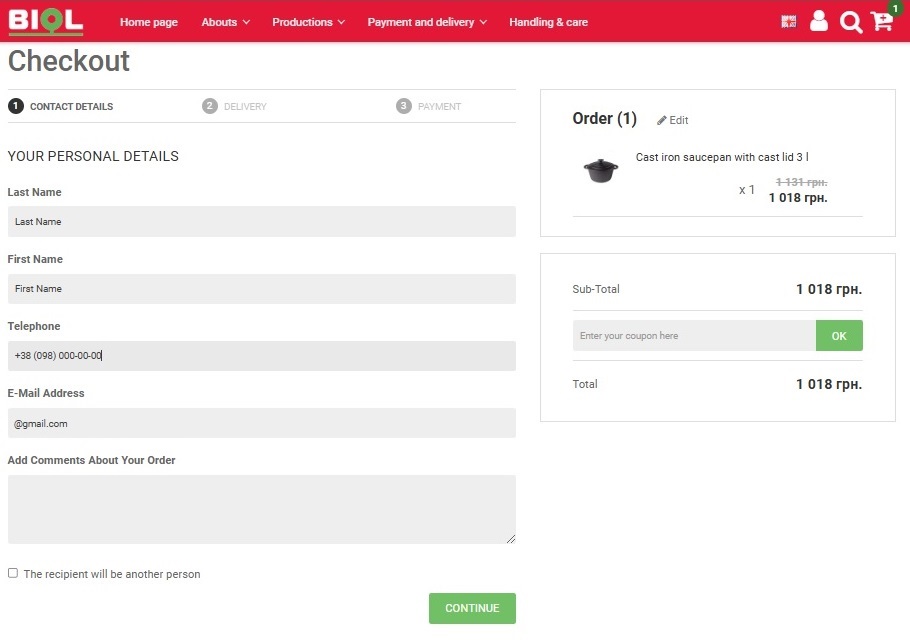
Log in with an already registered account, sign in with Facebook, Google Account or create an account during checkout. You can also place an order without creating an account.
Enter your promo code (if available) and click the "OK" button to apply the promo code.
Enter required contact details:
- Surname
- Name
- Phone number
If you want to create an account in the BIOL online store, check "I want to create a personal account and track my orders".
If necessary, add a comment to your order.
If the recipient will be another person, check "The recipient will be another person" and fill in the mandatory fields of the recipient:
- Surname
- Name
- Phone number
Click the "Continue" button.
STEP 2. Delivery
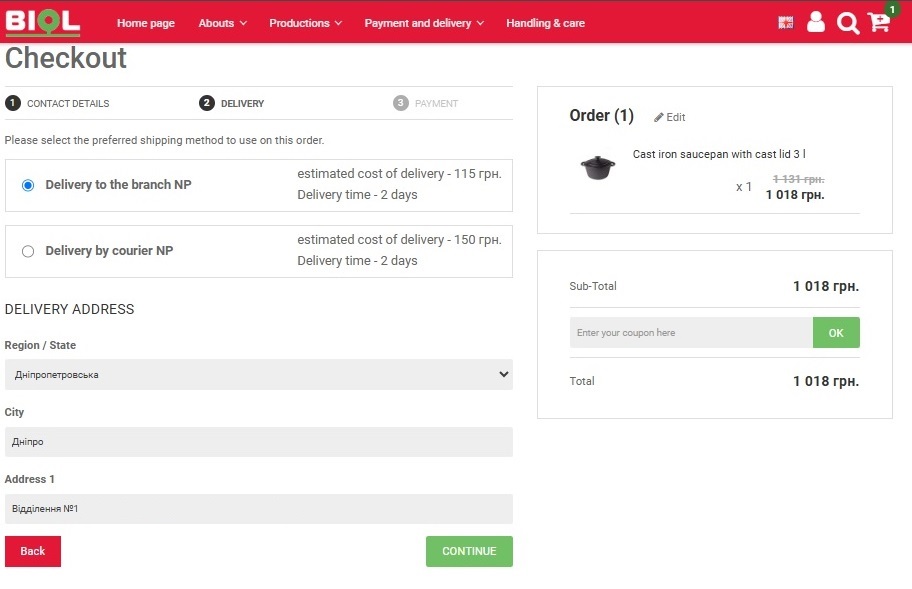
Choose delivery to a Nova Poshta branch or delivery by a Nova Poshta courier.
Then fill in the required fields:
- Region
- City, village
- Select a Nova Poshta branch from the list if you selected "delivery to a Nova Poshta branch", or enter the delivery address if you selected "delivery by a Nova Poshta courier".
After choosing a branch or filling in the address, you will see the estimated delivery cost and delivery time.
| We draw your attention to the fact that the cost of delivery is not included in the price of the order and is paid by the buyer separately when receiving the goods or when receiving the bill of lading from the carrier. |
Click the "Continue" button.
STEP 3. Payment
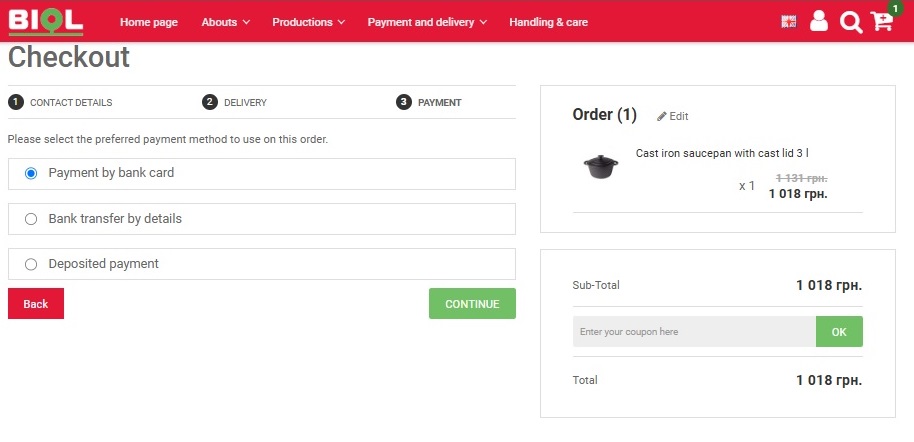
Choose the payment method you prefer from the list:
- Payment by bank card
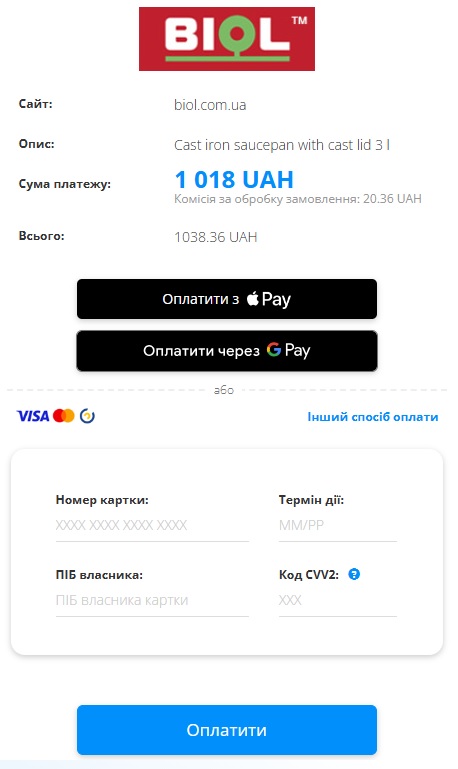
After confirmation, you temporarily leave our site and get to the page of the WayForPay payment system.
You can choose any payment method on the online payment page. In addition to payment by bank card, you can pay for your order using Privat24, Payment terminals, ApplePay, GooglePay. By clicking on the "other payment method" link, you can choose another available payment method.
Enter your bank card details on the WayForPay payment service website. Please note that at this stage, the purchase price includes a payment service fee of 2% of the order amount. To continue payment, click the "Next" button. Enter your e-mail address or phone number in the corresponding field (payment information will be sent to the indicated address) and click the "Pay" button.
In most cases, you will be redirected to the website of the bank that issued your card to confirm the payment. In the corresponding field, enter the Confirmation code that was sent to the mobile phone number you specified earlier.
Congratulations! You have successfully paid for your order with a Visa / MasterCard bank card.
- Bank transfer according to details
- Payment made
Click the "Continue" button.
Congratulations! Your order has been accepted!
You will see an order that you can print or save. A copy of the order will be sent to the e-mail address specified when placing the order.
DELIVERY:
The goods are delivered by the following delivery services:

By visiting the carrier's official website, you can calculate the approximate cost and delivery times. Payment for delivery is made upon receipt of the goods at the delivery service department.
Delivery by Nova Poshta courier - the courier will deliver the package to you at a time convenient for you from 9:00 a.m. to 9:00 p.m. (weekdays) to the address specified during the order. Enter your data without errors to send the goods. This service is available only on the territory of Ukraine.
Delivery time and cost are calculated individually.
The cost of delivery is paid by the recipient.
When receiving the order by the courier service, always check the integrity of the packaging, the absence of mechanical damage and the completeness, as well as the presence of all units of the product when receiving the order.